> For the complete documentation index, see [llms.txt](https://doc.appflow.ai/docs/llms.txt). Markdown versions of documentation pages are available by appending `.md` to page URLs; this page is available as [Markdown](https://doc.appflow.ai/docs/facebook-ads.md).
# Facebook Ads
#### 背景
用户可以集成facebook ads到appflow. 实现:
1. 获取facebook平台的广告投放成本(Spend on ads)
#### **如何配置appflow**
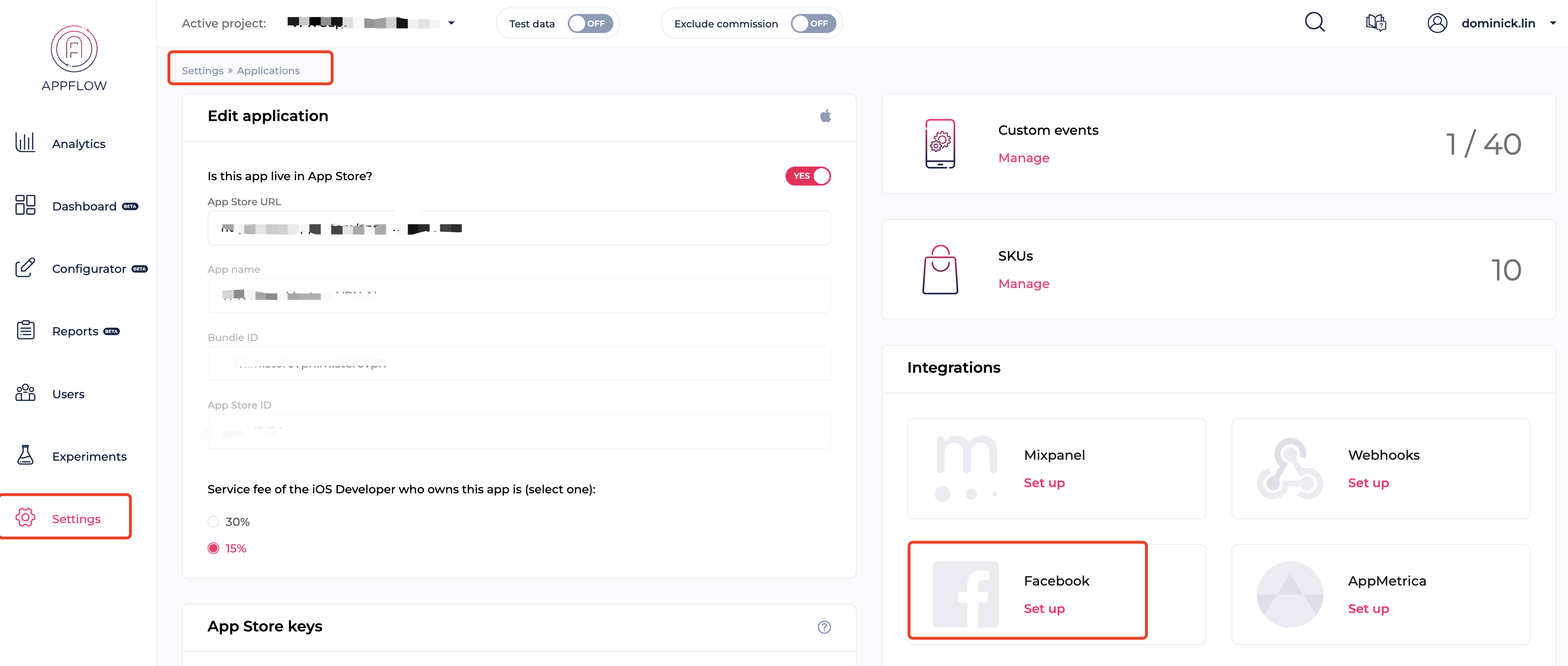
1. 在Settings板块,找到Applications,并编辑,打开的页面如下。
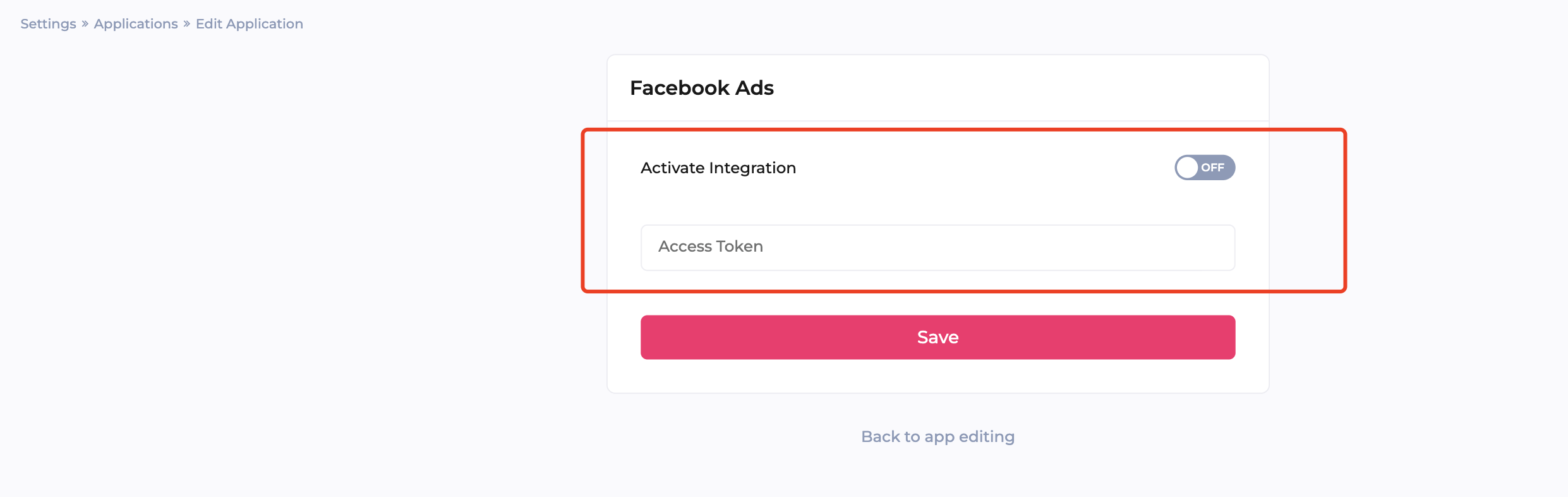
2. 给facebook integrations填入 Access Token, 并Activate Integration开启功能。
#### 如何获取Access Token
1. 在FB建立开发者账户并创建APP ID,配置BM
2. 研发在产品接入FB的SDK
3. 在event manager 配置App后生成Data source
4. 在Data source的settings获取access token
**TODO: 因为没有相关的环境,无法进行配置截图,后续需要补充配置细节**
### 非开发者模式获取token
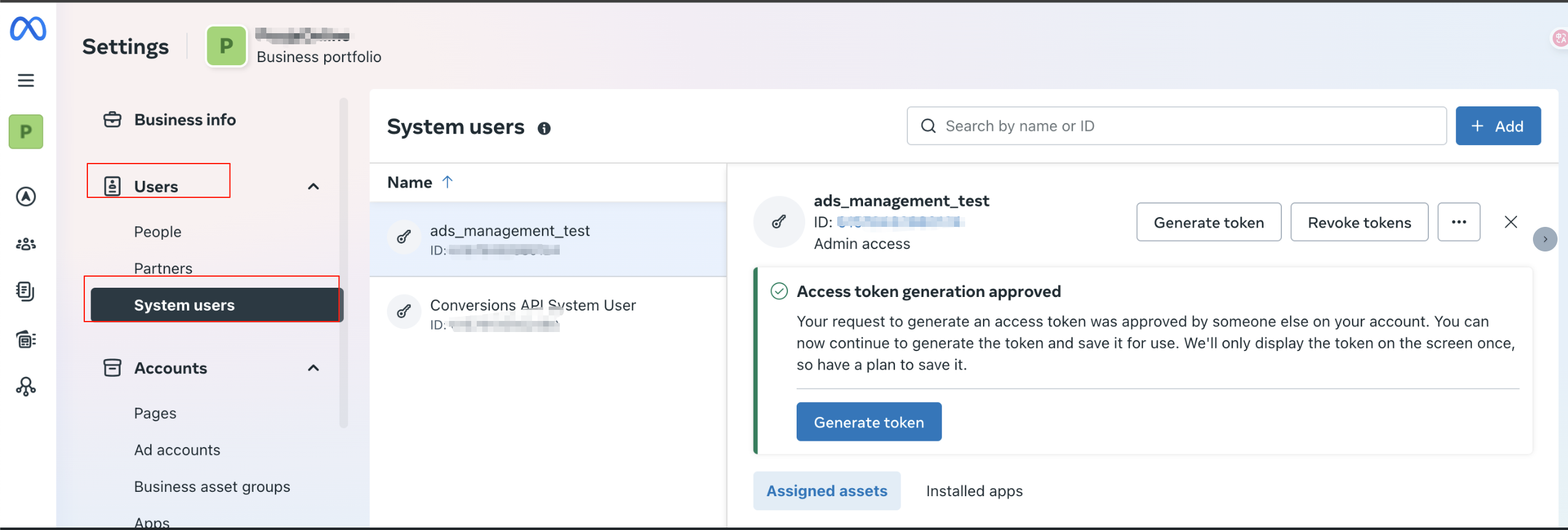
1. **在 BM → Users → System Users 新增 System User**
* 角色选择 **Admin**
2. **为 System User 关联目标广告账户**
* 进入 **Add Assets**
* 赋予 `Advertiser` 或 `Manage Ad Account` 等权限
3. **生成长期访问令牌**
1. 点击 **Generate New Token**
2. 选择本应用
3. 勾选权限:
* `ads_read`
* `ads_management`
* `business_management`
4. Token 有效期选择 **Never expires**
5. 生成后复制并保存 Token
部分截图
1.创建一个admin类型system user
2.选择相关adcount Assign permissions\

3.点击 **Generate New Token选择需要权**
---
# Agent Instructions
This documentation is published with GitBook. GitBook is the documentation platform designed so that both humans and AI agents can read, navigate, and reason over technical content effectively. Learn more at gitbook.com.
## Querying This Documentation
If you need additional information that is not directly available in this page, you can query the documentation by asking a question.
Perform an HTTP GET request on the following URL with the `ask` and `goal` query parameters:
```
GET https://doc.appflow.ai/docs/facebook-ads.md?ask=&goal=
```
`ask` is the immediate question: it should be specific, self-contained, and written in natural language.
`goal` is what the user is ultimately trying to achieve, the reason they need the answer. Sharing it helps GitBook give you a better, more relevant answer. A goal is most helpful when it describes the outcome the user wants rather than restating the question. For example, with `ask=how do I create an API token`, a goal like `automate deployments from our CI pipeline` lets GitBook tailor the answer to that use case.
The response will contain a direct answer to the question and relevant excerpts and sources from the documentation.
Use this mechanism when the answer is not explicitly present in the current page, you need clarification or additional context, or you want to retrieve related documentation sections.